
Patch Notes
Release Notes — April 2026
OCR Invoice Creation (AI), Bank Reconciliation, API Transaction Tracking and more.
Two-factor authentication, field changes via Excel extraction and import, and bug fixes.

It is now possible to enable two-factor authentication for Bluebee users. When logging in, they will need to enter their username and password and then enter the code displayed on the Microsoft Authenticator application (or other two-factor authentication software) on their smartphone. Enabling two-factor authentication is a simple and effective way to improve the security of your Bluebee environment.
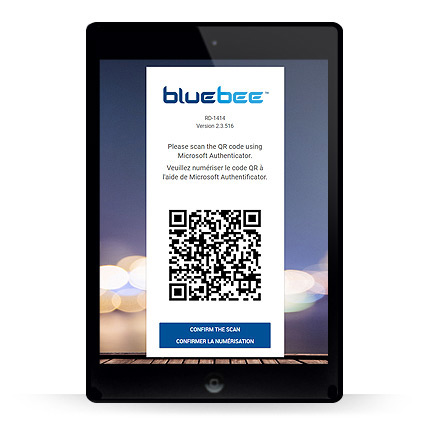
Easy setup
Once the setting is selected for the user, the next time they log in, they will be prompted to scan a QR code using Microsoft Authenticator.
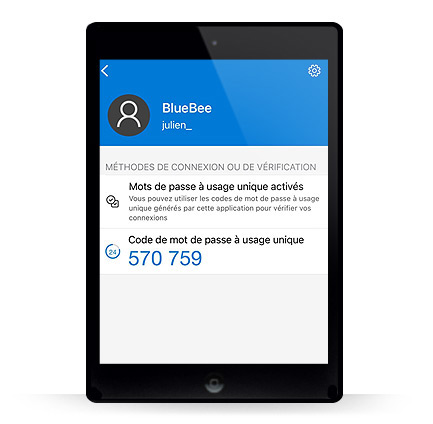
Using their smartphone, they will have to open the application and scan the QR code. Once done, they will simply have to enter the 6-digit code.
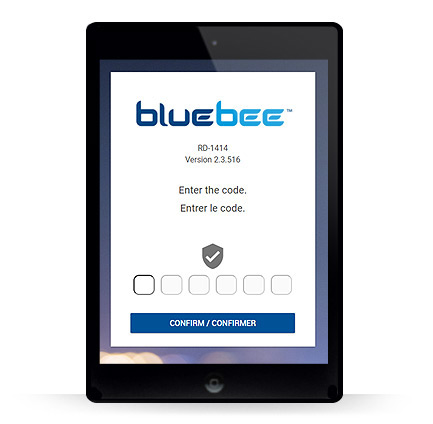
Each time the user logs in, they will need to open their Microsoft Authenticator application and enter the 6 digits that appear to access Bluebee.
Allow super users to extract a batch of data in Excel format, modify the data and import it into Bluebee to apply the changes.
General
Financial
Inventory
Sales Order, Pricing and Billing
Procurement
Production and Planning
OCR Invoice Creation (AI), Bank Reconciliation, API Transaction Tracking and more.
Electronic Funds Transfers, Shopify integration, and numerous bug fixes.
Redesign of several functions, Autocomplete in inquiry filter fields and bug fixes.
Let's talk about your business processes and see how Bluebee can help — from application support all the way to AI adoption.